







Hey, it's Mike....

We gave commercialization a try. It was an incredible experience, but it didn’t generate the resources needed to sustain PySimpleGUI at the level we had hoped. In February 2025, we announced that PySimpleSoft would be shutting down, with support continuing through the end of 2025.
That process is now complete. The next question was what to do with the code, documentation, and repositories. I always planned to keep the repos available for reference—so the decision came down to the software itself.

I’ve released the PySimpleGUI 5 code as open source. After removing licensing and security components, it’s now available under the LGPL3 license on GitHub and PyPI.
To install the latest version (v6):
python -m pip install PySimpleGUI
If you need the older version (4.60.5.1):
python -m pip install PySimpleGUI==4.60.5.1
The GitHub repo has the most up-to-date code. You can install directly without cloning:
python -m pip install --upgrade https://github.com/PySimpleGUI/PySimpleGUI/zipball/master
Or clone/download the repo and install locally:
python -m pip install .
I’m still wrapping up the transition from version 5 to 6, including the docs. After that, I’m honestly not sure what the long-term future looks like—but if the past 8 years are any indication, I’m not great at predicting it.
For now, I’m here and happy to help.
PySimpleGUI has been a once-in-a-lifetime experience. It’s been amazing to see what people have built and to be a small part of it. Thanks to everyone who supported the project over the years.
PySimpleGUI is a wrapper for tkinter (and other GUI libraries) that transforms the GUI SDK into a simpler, more compact architecture while still providing detailed customization. No prior GUI programming experience needed.
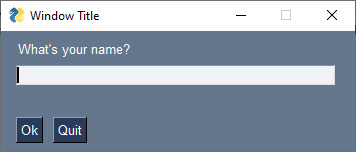
This is an entire interactive application.
import PySimpleGUI as sg

# Define the window's contents
layout = [[sg.Text("What's your name?")],
          [sg.Input(key='-INPUT-')],
          [sg.Text(size=(40,1), key='-OUTPUT-')],
          [sg.Button('Ok'), sg.Button('Quit')]]

# Create the window
window = sg.Window('Window Title', layout)

# Display and interact with the Window using an Event Loop
while True:
    event, values = window.read()
    # See if user wants to quit or window was closed
    if event == sg.WINDOW_CLOSED or event == 'Quit':
        break
    # Output a message to the window
    window['-OUTPUT-'].update('Hello ' + values['-INPUT-'] + "! Thanks for trying PySimpleGUI")

# Finish up by removing from the screen
window.close()
This is the window that's created.
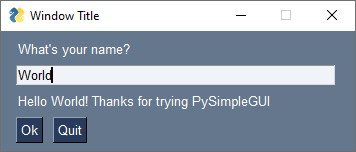
Here's the same window after some user interaction.
You'll find extensive documentation at:
PySimpleGUI has always been developed more like a proprietary product than an open source project. Pull requests aren't accepted.

Seems most projects have something to say about AI usage now. This is my opinion and how I've decided to use AI. It's what's right for me. It might not be right for you or anyone else.
I use LLMs to search and summarize documentation, lookup errors, do research, get knowledge. I don't use LLMs to write code. My reason is very simple.
I fell in love with programming 50 years ago. Writing software is my happy place. Why would I give that to a computer to do instead of getting the enjoyment I get from doing it? AI can generate lots of things. The feeling I get writing software is not one of the things AI can generate.
I'm not in a hurry. If I wanted code written for me, I would have opened the project up to pull requests years ago, but I didn't because I wanted to write the code. It's fun!
One question that it floating around about software, libraries, etc, is whether or not the library is relavent. There are people discovering and installing PySimpleGUI every day. Applicatsions are often build incrementally. When new features are added to a GUI application the layouts can change. Buttons need to move, etc. It's a lot earier to do that if you understand the code, whether it's written by AI or by hand. Modifying it will be necessary most likely.
I use PySimpleGUI to write software frequently. I can't imagine not using it to write a Windows application. I've been building a 6502 breadboard computer. So I can watch what's happening in the system, created a bus analyzer program using a couple of Raspberry Pi Pico's and a PySimpleGUI application that controls it all running on Windows.
That's enough for me to make some effort to get the ecosystem cleaned up and operational.
Copyright 2018-2026 PySimpleGUI. All rights reserved.
Licensed under LGPL3.