





A privacy-first household budget book you fully self-host — a fast PWA on every device, backed by a real scoped API for automation. No cloud, no accounts, no tracking, no telemetry.
Runs in the browser on all major platforms — iOS, Android, macOS, Windows, Linux — and installs to the home screen like a native app.
Designed for private self-hosting: data lives only on your own server — by default in an embedded SQLite file (no separate database required), optionally in an external MariaDB, all in your own container. Every asset (fonts, icons, JS libraries) is served from your own origin, so the app makes no CDN calls and no external connections at all.
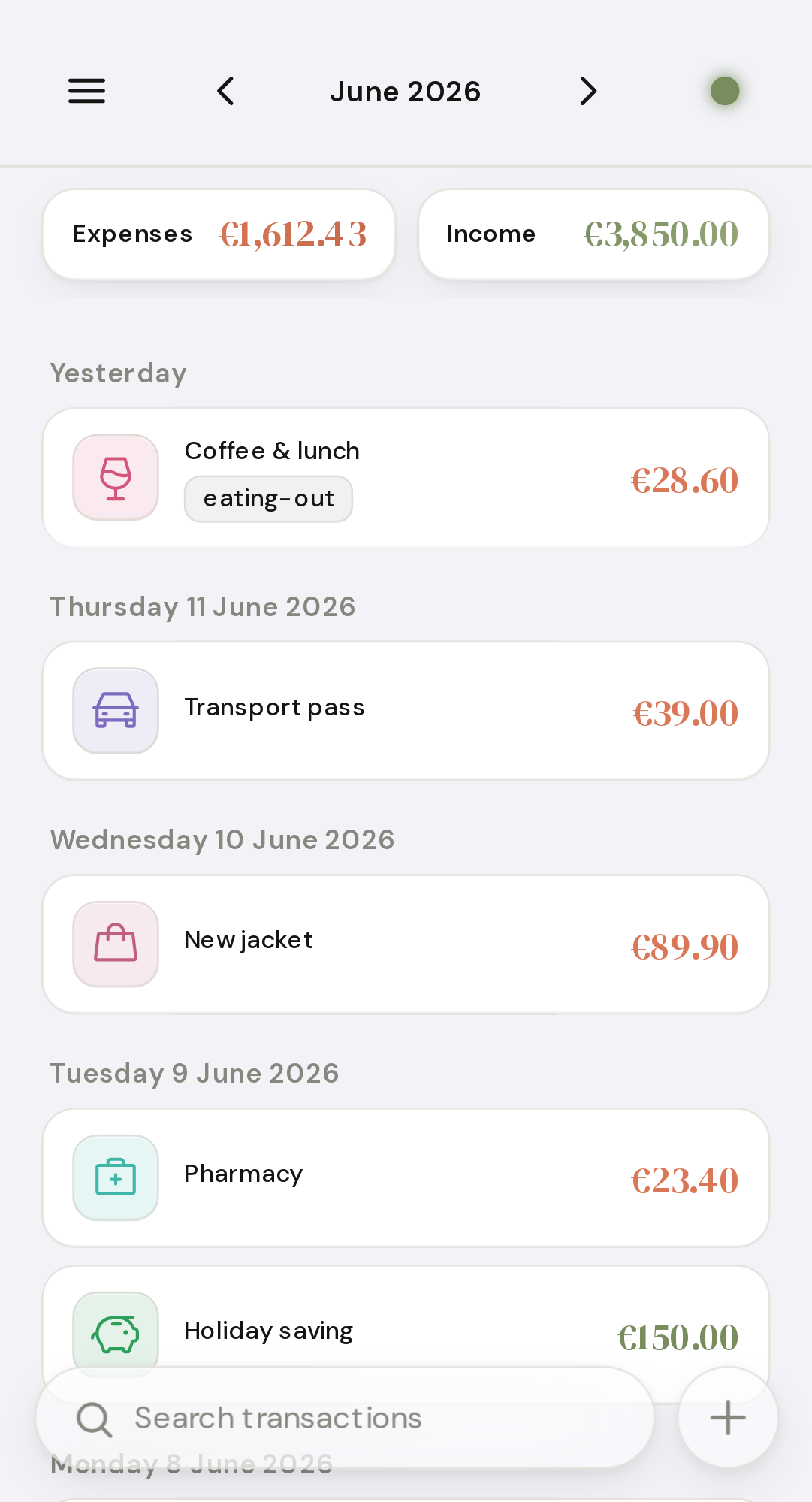
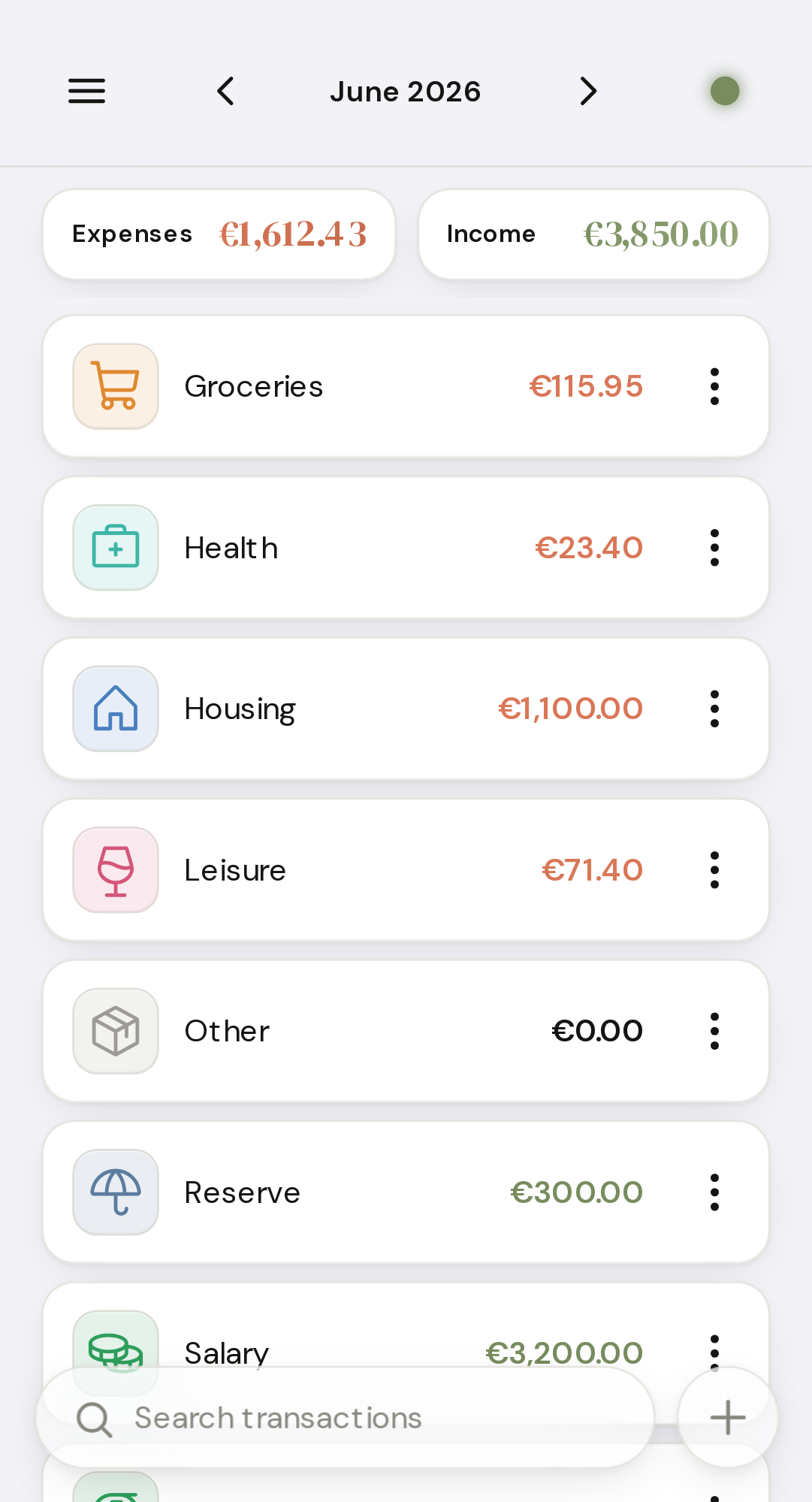
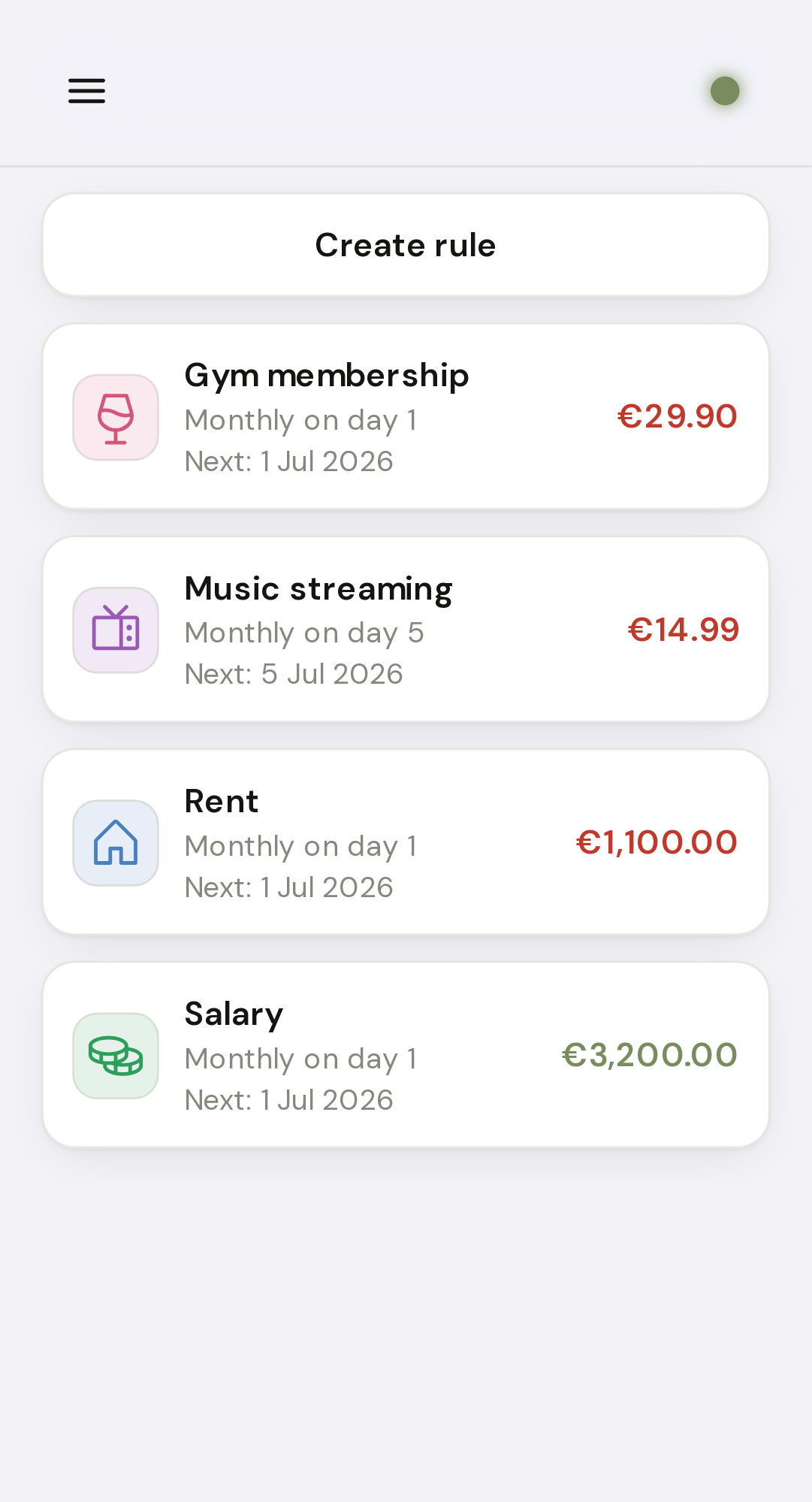
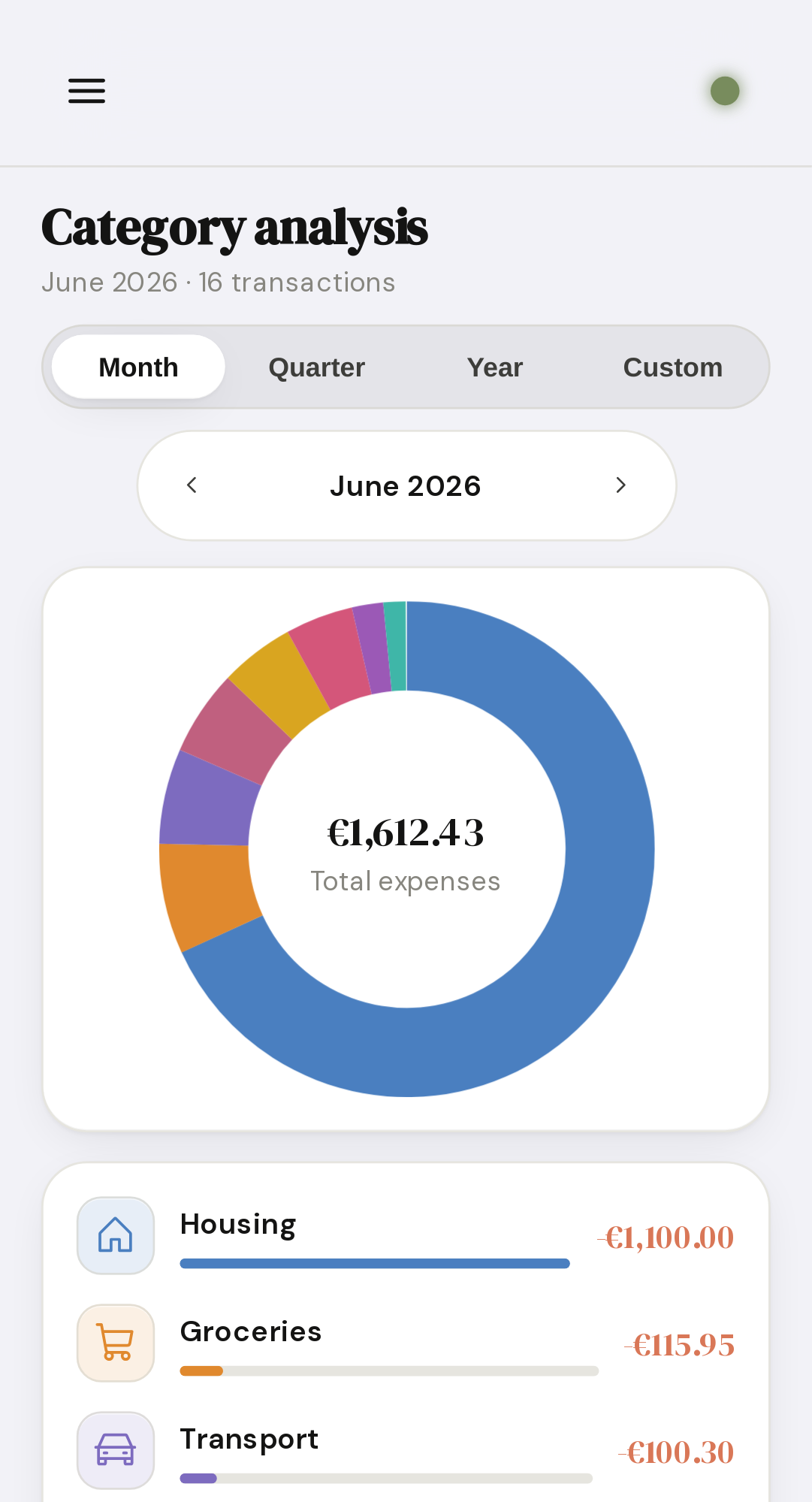
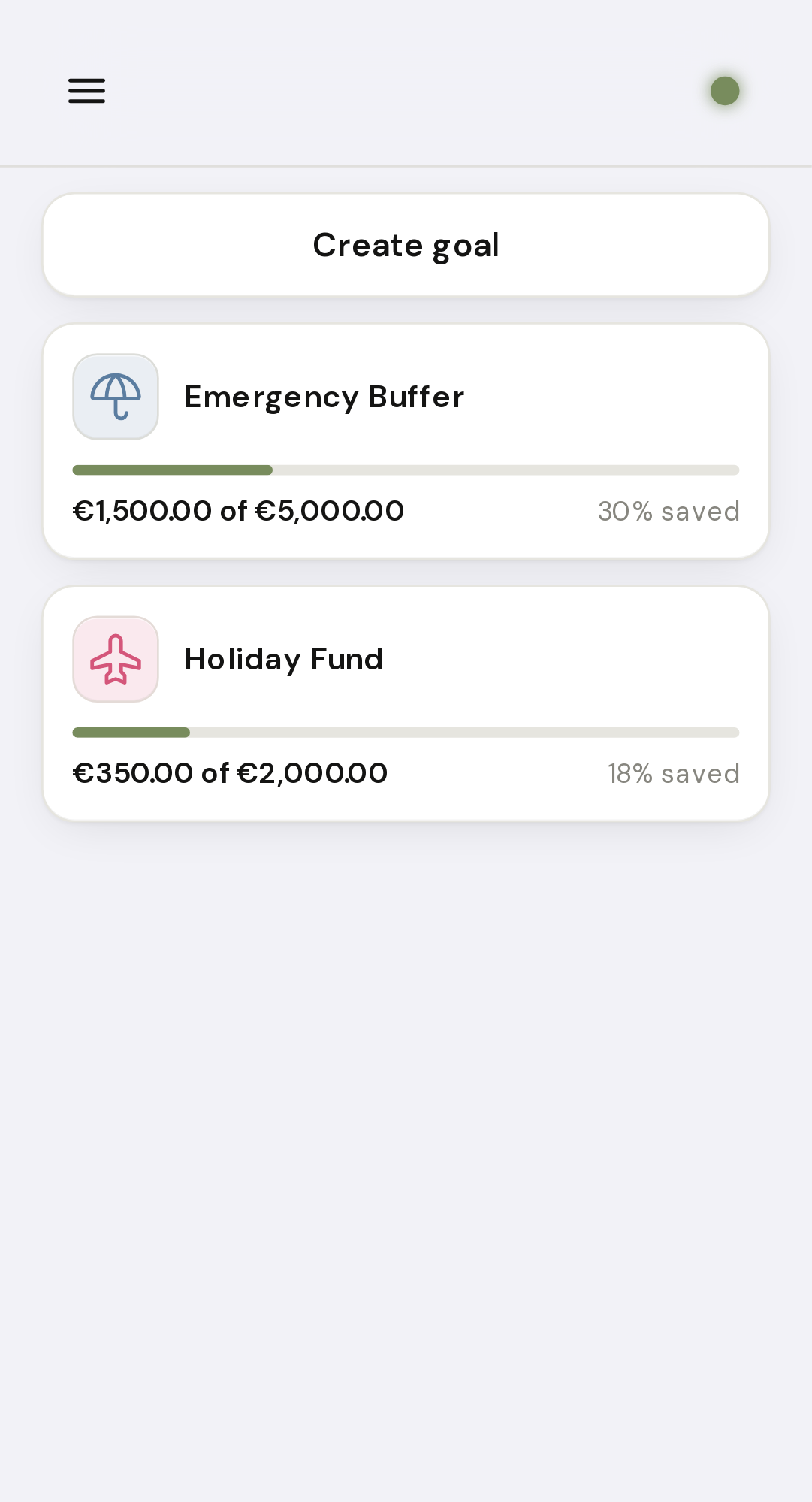
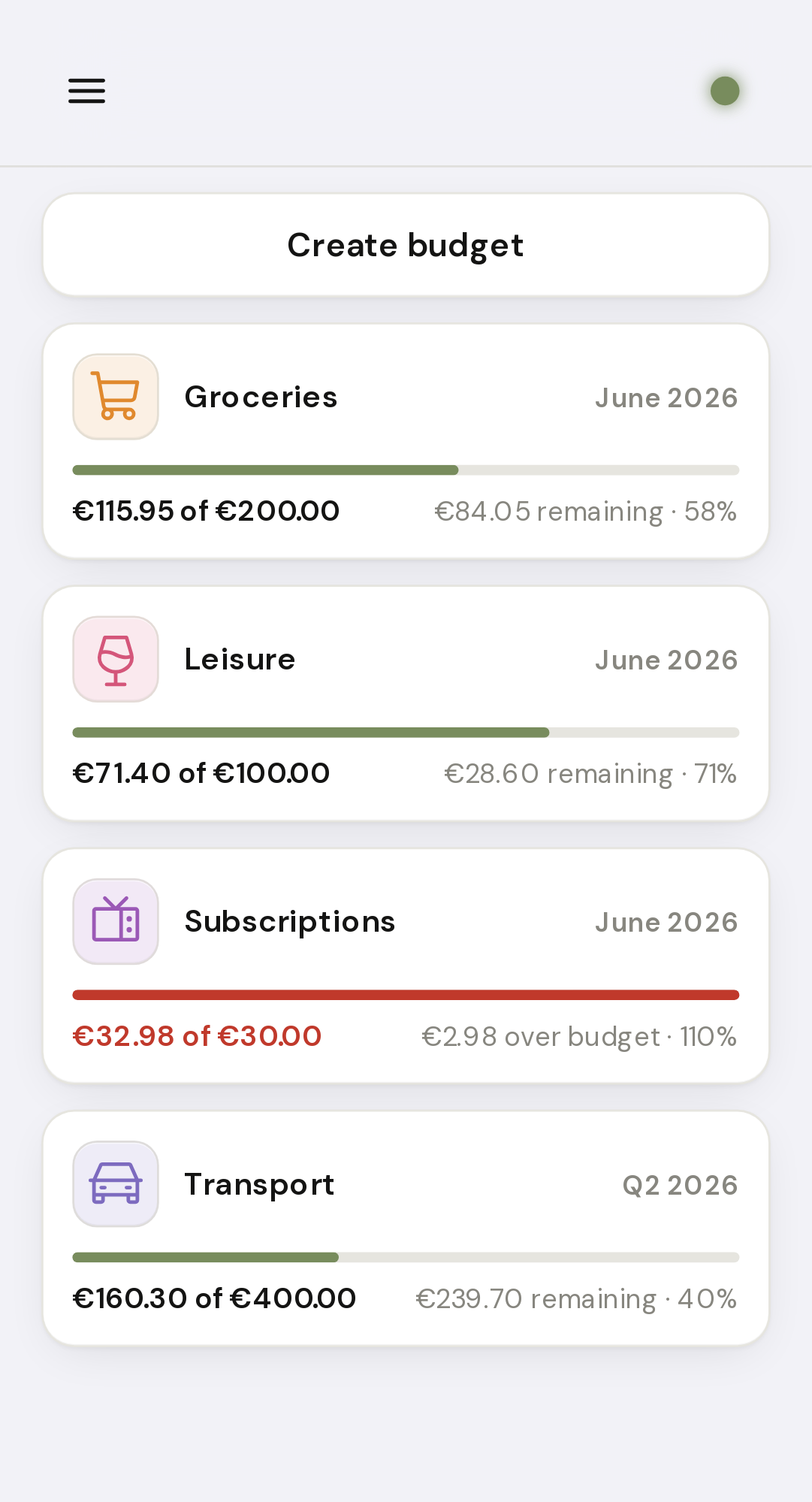
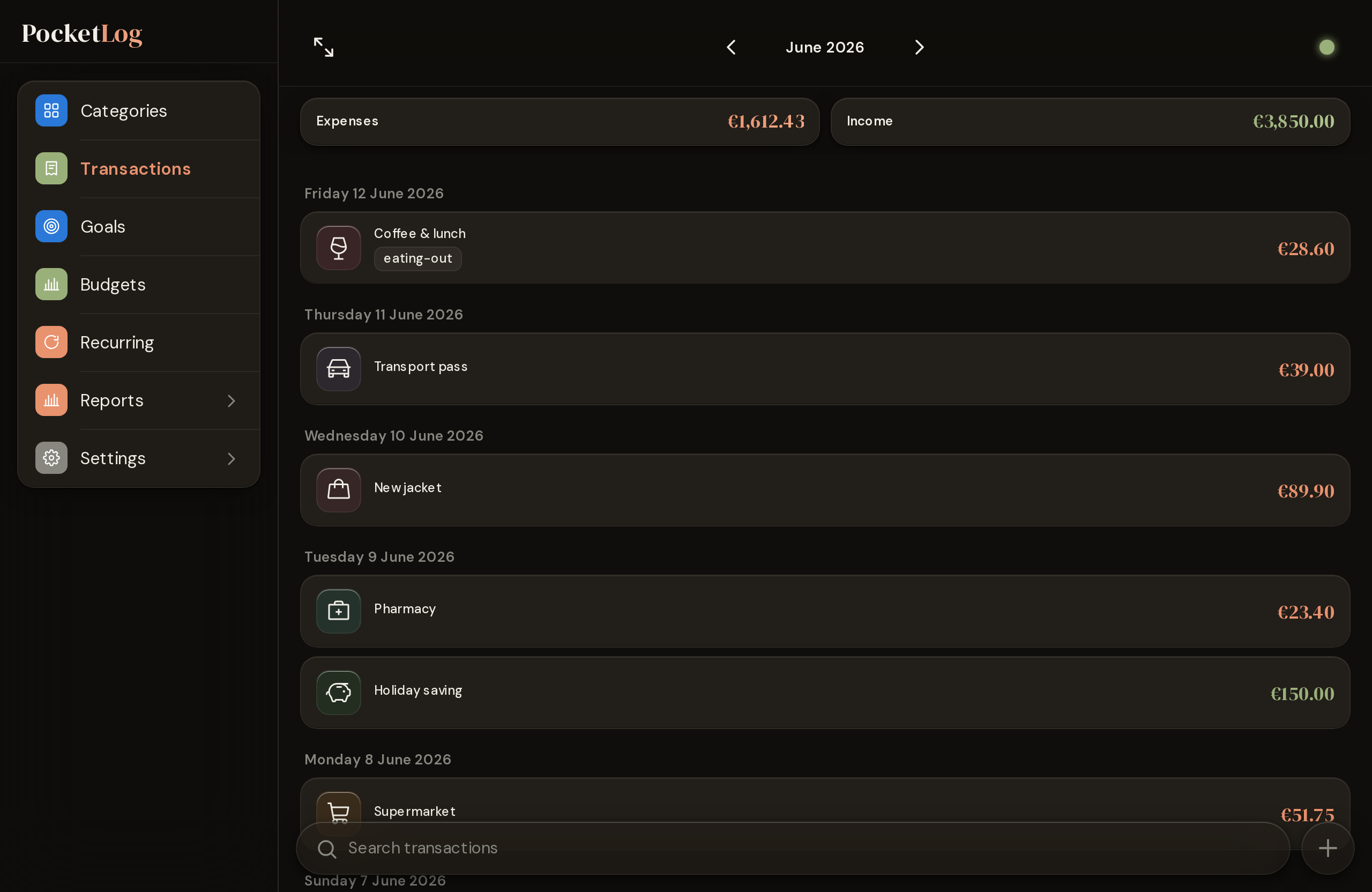
Mobile — the app's primary form factor: ledger, categories, recurring rules, category analysis, savings goals, per-category budgets. Below: the desktop sidebar layout in dark theme.
- Screenshots
- Features
- Requirements
- Quick Start
- Configuration
- Reverse Proxy
- Login & Security
- API Access
- Logging & Audit Trail
- Backup & Restore
- Emergency Recovery
- Image
- License
- Transactions — income & expenses with date, amount, category, and tags
- Categories — freely definable (name, icon, color); a default set is created on first use
- Tags — free-form labels per transaction; rename or delete centrally
- Goals — savings targets and debt tracker in one: link a goal to a category and PocketLog calculates your progress automatically from that category's transactions. Goals are tracked separately and do not affect your balance
- Budgets — per-category spending caps: set a limit per category over a monthly, quarterly, or yearly period and PocketLog shows how much of it you've used in the current period, with the bar turning red once you go over. Calculated automatically from that category's expenses; budgets do not affect your balance, and a category can have both a goal and a budget
- Recurring transactions — define rules for transactions that repeat (rent, subscriptions, salaries) and PocketLog books them automatically at the next due date. Frequencies daily / weekly / monthly / quarterly / yearly with a configurable interval, anchored to a weekday or day of the month. Optional end date or maximum number of occurrences; individual upcoming occurrences can be skipped. Rules can be paused and resumed at any time, and tags can be assigned to a rule so every auto-booked transaction inherits them. A small icon marks auto-booked transactions in the list; a notification reports how many were added since the last visit
- Reports & Charts — monthly/yearly overview, category and tag reports, trend view and forecast
- Bulk actions — select multiple transactions at once to reassign a category, add or remove tags, or delete them in one step
- Search — full-text, category, and tag filtering in the transaction list
- CSV Import / Export — UTF-8 or CP1252, max. 5 MB; export all transactions as semicolon-delimited CSV. Import is also available over the API for automated workflows (see API Access), with duplicate rows skipped on re-import so overlapping bank exports don't double-book
- API access — per-user API keys (bearer tokens) with scoped permissions (read, import, write) for programmatic access; lets external tools drive the CSV import — or full read/write sync — without a browser session (see API Access)
- Offline capability — app works without a connection; changes sync automatically when back online
- Themes — Light, Dark, System (saved in settings)
- Language & Currency — German/English with regional variants (de-DE, de-AT,
de-CH, en-GB, en-US) control both translation and date/number formatting;
display currency (EUR, USD, GBP, CHF, JPY) freely selectable. Configurable per
user; instance default via
DEFAULT_LOCALE/DEFAULT_CURRENCY(see Configuration) - Multi-user — each identity has its own data; admin creates additional users
- Built-in login — username/password with admin role, setup flow, and brute-force protection
- Docker (or Podman)
- Optional: MariaDB 10.6+ (external instance) — only if you do not want to use the built-in SQLite database
By default, PocketLog uses an embedded SQLite database at
/config/db/pocketlog.db — no separate database, no DB variables required.
Mount /config to the host so that data survives container updates.
docker run -d \
  --name pocketlog \
  -p 8000:8000 \
  -e PUID=1000 -e PGID=1000 \
  -e TZ=Europe/Berlin \
  -v /mnt/user/appdata/pocketlog:/config \
ghcr.io/anym001/pocketlog:latestPUID/PGID determine which host user owns the files under /config
(see Configuration). On Unraid, typically PUID=99 / PGID=100.
On first access (http://<host>:8000) a setup screen appears. Create the first admin
account (username + password, minimum 12 characters with upper/lowercase letters, a
number, and a special character). Additional users are created by the admin under
Settings → User Management.
If you prefer to run an external MariaDB, create a database there …
CREATE DATABASE pocketlog CHARACTER SET utf8mb4 COLLATE utf8mb4_unicode_ci;
CREATE USER 'pocketlog'@'%' IDENTIFIED BY 'your-password';
GRANT ALL ON pocketlog.* TO 'pocketlog'@'%';
FLUSH PRIVILEGES;
… and set the DB_* variables at startup. As soon as any DB_* variable is set,
PocketLog switches to MariaDB (instead of SQLite); DB_PASSWORD is then required:
docker run -d \
  --name pocketlog \
  -p 8000:8000 \
  -e DB_HOST=mariadb \
  -e DB_NAME=pocketlog \
  -e DB_USER=pocketlog \
  -e DB_PASSWORD=your-password \
  -e TZ=Europe/Berlin \
  ghcr.io/anym001/pocketlog:latest
MariaDB 11.6+ (
innodb_snapshot_isolation): From MariaDB 11.6 theinnodb_snapshot_isolationsetting can be ON by default. Under it, two requests writing the same row at once (e.g. the offline outbox reconnecting and replaying queued writes, plus the per-request session refresh) get a transientERROR 1020 … try restarting transaction. PocketLog retries these automatically, so no action is required. If you'd rather remove the errors at the source, setinnodb_snapshot_isolation = OFFin your MariaDB config — PocketLog does not rely on snapshot isolation. Standalone InnoDB before 11.6 and the default SQLite backend are unaffected.
| Variable | Default | Description |
|---|---|---|
PUID |
1000 |
Host user ID that owns files under /config (Unraid: 99) |
PGID |
1000 |
Host group ID for /config (Unraid: 100) |
SQLITE_PATH |
/config/db/pocketlog.db |
Path to the SQLite file (only without DB_*) |
DB_HOST |
mariadb |
MariaDB option only: hostname or IP. Setting any DB_* variable switches from SQLite to MariaDB. |
DB_PORT |
3306 |
MariaDB option only: port |
DB_NAME |
pocketlog |
MariaDB option only: database name |
DB_USER |
pocketlog |
MariaDB option only: database user |
DB_PASSWORD |
– | MariaDB option only: password (required once MariaDB is active) |
DATABASE_URL |
– | Advanced: full database connection URL; overrides DB_*/SQLite (e.g. for SSL, socket, custom driver) |
TZ |
UTC |
Container timezone |
LOG_LEVEL |
INFO |
Log level (DEBUG, INFO, WARNING, ERROR). Audit events (logins, lockouts, admin actions) are at INFO/WARNING. |
LOG_FORMAT |
text |
Log format: text (human-readable line) or json (one structured JSON object per line, for aggregators like Loki/ELK). Applies to both docker logs and LOG_FILE. |
LOG_FILE |
– | Writes logs in addition to docker logs into this file (rotating). Recommended: /config/logs/audit.log with a mounted /config directory, to retain logs across container updates (see Logging & Audit Trail). |
LOG_FILE_MAX_BYTES |
10485760 |
Log file rotation size in bytes (default 10 MB). |
LOG_FILE_BACKUPS |
5 |
Number of rotated log files to retain. |
DEFAULT_LOCALE |
de-DE |
Starting locale for new accounts (BCP-47: de-DE, de-AT, de-CH, en-GB, en-US). Each user can override it. |
DEFAULT_CURRENCY |
EUR |
Starting currency for new accounts (ISO 4217: EUR, USD, GBP, CHF, JPY). Display only, overridable per user. |
SESSION_COOKIE_SECURE |
auto |
Controls the Secure flag on session cookies. auto (default): set when the browser-facing transport is HTTPS, detected via X-Forwarded-Proto (honoured only from a trusted proxy, see TRUSTED_PROXIES) or the raw request scheme — works for direct HTTP (LAN / first-run) and HTTPS-proxy setups without any change. 1: always set (use when your proxy does not forward X-Forwarded-Proto). 0: never set. |
TRUSTED_PROXIES |
(private ranges) | Comma-separated IPs or CIDR ranges of trusted reverse proxies (e.g. 172.16.0.0/12,192.168.1.1), or * to trust all peers. Decides which sources may set X-Real-IP/X-Forwarded-For (audit log) and X-Forwarded-Proto (Secure-cookie detection). Empty (default) trusts the standard private/loopback ranges (127.0.0.0/8, 10.0.0.0/8, 172.16.0.0/12, 192.168.0.0/16, ::1/128, fe80::/10), so a container on a private network behind a proxy works out of the box; an explicit list replaces those defaults. |
LOGIN_IP_LOCKOUT_THRESHOLD |
20 |
Failed logins/setup attempts from one source IP before the per-IP backoff starts. Deliberately above the per-user threshold — a household behind one NAT/proxy IP shares this budget. |
LOGIN_IP_LOCKOUT_MAX_SECONDS |
600 |
Cap for the per-IP backoff (doubles per failure beyond the threshold). |
LOGIN_IP_FAILURE_WINDOW_SECONDS |
900 |
Failures older than this no longer count toward the per-IP threshold. |
SESSION_LIFETIME_HOURS |
24 |
Session duration without "Stay logged in" |
SESSION_REMEMBER_DAYS |
30 |
Session duration with "Stay logged in" |
SESSION_ABSOLUTE_DAYS |
7 |
Maximum session duration (standard) |
SESSION_REMEMBER_ABSOLUTE_DAYS |
90 |
Maximum session duration (remember-me) |
PocketLog runs on port 8000 and ships with its own login — no upstream identity provider required. Any reverse proxy can sit in front of it (nginx, Caddy, Traefik …). Nginx example:
server {
    listen 443 ssl;
    server_name pocketlog.example.com;

    location / {
        proxy_pass         http://localhost:8000;
        proxy_set_header   Host              $host;
        proxy_set_header   X-Real-IP         $remote_addr;
        proxy_set_header   X-Forwarded-Proto $scheme;
    }
}
With this setup PocketLog detects HTTPS automatically via X-Forwarded-Proto and
sets the Secure cookie flag accordingly — no extra configuration needed, as
long as the proxy sits on a private network (trusted by default).
X-Forwarded-Proto and X-Real-IP/X-Forwarded-For are only honoured when the
proxy's IP is trusted (TRUSTED_PROXIES). The default already trusts the
standard private/loopback ranges, so a proxy on a Docker bridge or LAN works out
of the box. Override TRUSTED_PROXIES only to narrow it down to a specific proxy
(e.g. -e TRUSTED_PROXIES=172.17.0.5), or set -e TRUSTED_PROXIES=* for a
single-proxy setup where the container port is not directly reachable from
untrusted networks.
- Password policy: minimum 12 characters with upper/lowercase letters, a number, and a special character
- Brute-force protection: after several failed attempts an automatic lockout period kicks in; admins can lift it via Reset Password
- Per-IP throttle: failed logins (and setup probes) are additionally counted per
source IP with an exponential backoff, so distributing guesses across many usernames
doesn't dodge the lockout and a third party can't hammer a known account into a
permanent lockout for free (tunable via
LOGIN_IP_*, see Configuration) - Session: active for 24 hours by default, 30 days with "Stay logged in"; after an absolute maximum of 7 or 90 days a new login is required
Beyond the browser, PocketLog exposes its API for programmatic access via API keys (bearer tokens). The primary use case is automated CSV import — for example a bridge tool that converts your bank's export and uploads it on a schedule — without needing an interactive browser session.
Open Settings → API keys, enter a name, choose a scope, and create the key.
The key (format plk_…) is shown only once — copy it right away; PocketLog
stores only its hash and cannot recover the original. You can revoke a key at any
time from the same screen.
Each key carries a single scope, in a hierarchy where the higher tier includes the lower ones:
| Scope | Grants |
|---|---|
read |
all read endpoints (transactions, categories, tags, CSV export, JSON backup export) |
import |
CSV import only (POST /api/import/csv) |
write |
full data access — every create / update / delete plus import and read |
write is the top data tier; there is intentionally no admin API scope.
User management, the bulk-delete endpoints, and API-key management stay
session-only — they are never reachable with a bearer token, so a leaked key
can never take over the instance or wipe all data. Keys are bound to the user
who created them and respect the same per-user data isolation as the web UI.
Send the file as multipart form data with the key in the Authorization header:
curl -X POST https://pocketlog.example.com/api/import/csv \
  -H "Authorization: Bearer plk_your_key_here" \
  -F "file=@transactions.csv"
Response:
{ "imported": 12, "skipped": 0, "deduped": 0, "errors": [] }The CSV uses a header row with the columns date, amount, type,
description, category, and tags; the delimiter (;, ,, tab, or |) is
auto-detected. A ready-made example is available under Settings → CSV import.
Deduplication: every imported row gets a fingerprint derived from its date,
amount, description, and type. Re-importing an overlapping export skips rows that
are already present instead of booking them twice — those are counted under
deduped:
{ "imported": 0, "skipped": 0, "deduped": 12, "errors": [] }Unlike browser requests, bearer-token calls do not require the CSRF header (a browser never sends the token automatically, so CSRF does not apply). All other security — per-user isolation, the 5 MB / row limits, and formula-injection guards — applies identically.
PocketLog logs security-relevant events (logins including failed attempts, lockouts, password changes, admin user actions, deletion of all own data, and create / update / delete / catch-up events for recurring rules). Passwords, hashes, security tokens, or user-supplied free-text (rule names, descriptions, amounts) are never logged.
By default output goes to stdout/stderr, i.e. into docker logs.
This survives container restarts, but not an update with docker rm.
There are two approaches for a persistent audit trail:
Option A — Log file in the app directory (in-app, simple):
PocketLog follows the common self-hosting convention: a single app directory at
/config inside the container, mounted to the host. It holds the SQLite database
(/config/db/, unless an external MariaDB is used) and the audit trail
(/config/logs/) — one mount covers the entire persistent app state.
docker run -d \
  --name pocketlog \
  -p 8000:8000 \
  -e DB_HOST=mariadb -e DB_NAME=pocketlog \
  -e DB_USER=pocketlog -e DB_PASSWORD=your-password \
  -e LOG_FILE=/config/logs/audit.log \
  -v /mnt/user/appdata/pocketlog:/config \
  ghcr.io/anym001/pocketlog:latest
Writes in addition to docker logs into the file (rotating; size/count via
LOG_FILE_MAX_BYTES / LOG_FILE_BACKUPS). The missing directory is created
automatically. If the file is not writable, the app continues and logs only to
stderr (with a warning). The mounted /config folder persists across container
updates.
Unraid: Map
/configto/mnt/user/appdata/pocketlogin the template and setLOG_FILE=/config/logs/audit.log— the entire app state then lives under a single path in your appdata share.
Option B — Docker log driver (platform-side, "12-Factor"):
Let the app log to stderr unchanged and leave persistence to the host,
e.g. via journald:
docker run -d --name pocketlog \
  --log-driver=journald \
  … (remaining options) …
Logs then land in the systemd journal (journalctl CONTAINER_NAME=pocketlog) and
survive container updates without the app needing to manage files.
Option A is most convenient for single instances; Option B is cleaner when a centralised logging infrastructure (journald, syslog, Loki …) is already in place. Both can be combined.
Two complementary layers:
Every user can download a full backup of their own account under
Settings → Import/Export → Backup: transactions, categories, tags, goals,
budgets, recurring bookings, and settings in one versioned JSON file
(GET /api/export/json, also available to read-scoped API keys for
scheduled off-site pulls).
Restoring (POST /api/import/json) is a migration/recovery path, not a merge:
it only runs against an account without ledger data. On a fresh instance —
or after Delete all data — upload the file and the account comes back
exactly as exported, including recurring-rule state, so no booking is created
twice. Restore is session-only and never reachable with an API key.
The SQLite database runs in WAL mode — a plain file copy of a running
instance is not a valid backup. Use the CLI, which snapshots via SQLite's
VACUUM INTO and is safe while the app keeps running:
docker exec pocketlog pocketlog backup
# → /config/db/backups/pocketlog-YYYYMMDD-HHMMSS.db
(The first pocketlog is the container name, the second the CLI launcher
inside the image; python -m app.cli backup remains equivalent.)
--output <file-or-directory> picks a different target. A cron line on the
host makes it nightly:
15 3 * * * docker exec pocketlog pocketlog backupRestore by stopping the container and replacing /config/db/pocketlog.db
with the snapshot (remove any leftover -wal/-shm files next to it).
With the MariaDB option, back up on the database side instead:
mariadb-dump --single-transaction pocketlog.
Forgot the admin password:
docker exec -it pocketlog pocketlog reset-admin-passwordResets the password and any lockout; a new password must be set on the next login.
--username <name> resets a specific account instead of the default admin.
Published to GHCR and Docker Hub — use whichever you prefer:
docker pull ghcr.io/anym001/pocketlog:<tag>
docker pull anym001/pocketlog:<tag>      # Docker Hub
| Tag | Source | Purpose |
|---|---|---|
:X.Y.Z |
Release tag on main |
Production — fixed version, update when ready |
:latest |
Latest main state |
Tracks every main merge |
:dev |
Latest dev state |
Maintainers only — pre-production/staging for testing |
Recommendation: Pin production to a fixed :X.Y.Z tag (not :latest),
so a new main merge does not silently update your instance — and rollback is
trivial (point to the old tag). A staging instance can track :dev
(or :latest) to review changes before production. The branching and release
workflow is described in CONTRIBUTING.md.
PocketLog is released under the GNU Affero General Public License v3.0
(AGPL-3.0). You may use, redistribute, and modify the software — if you offer a
(modified) version as a networked service, you must make the complete source code
available (AGPL §13). The full license text is in LICENSE.
Copyright (C) 2026 anym001
Built with Claude Code