Morgenne Besenschek
James Robertson
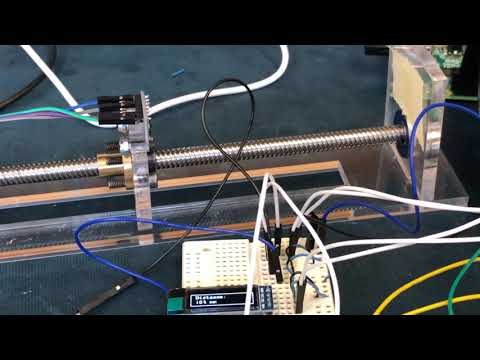
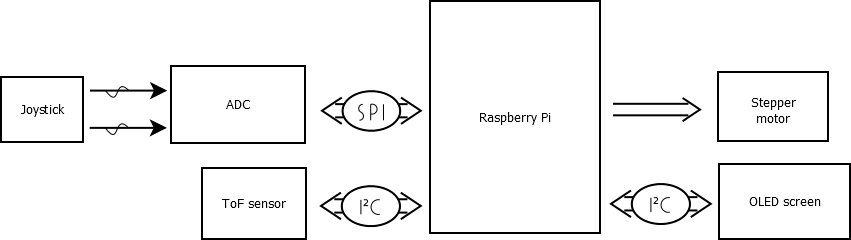
This circuit highlights the use of a joystick to control the connected devices. By moving the joystick left or right, the stepper motor will move clockwise or counterclockwise. The stepper motor moves faster the further away from neutral the joystick is. Moving the motor changes the position of the time of flight sensor, which detects how close an object is. Users can move the sensor back and forth, and view how far away the sensor is from the other side of the device by reading the OLED screen.

-
The value of having the abs_x_pos and abs_y_pos functions are that they convert the raw joystick output values to a familiar scale, where neutral joystick position is at (0,0): joystick.py
def abs_x_pos(lr_pos):
    if lr_pos > 516:
        abs_pos = lr_pos - 516
    elif lr_pos < 516:
        abs_pos = -1*(516-lr_pos)
    else:
        abs_pos = 0
    return abs_pos

def abs_y_pos(ud_pos):
    if ud_pos > 506:
        abs_pos = ud_pos - 506
    elif ud_pos < 506:
        abs_pos = -1*(506-ud_pos)
    else:
        abs_pos = 0
    return abs_pos
-
The
sleep(val)function in joystickstepper.py was another key thing for us to implement for stepper control as it allowed us to ramp the speed of the stepper motor shaft based on the position of the joystick. The function relies on the linear equationslp(val) = -0.00018 * val + 0.1wherevalis the absolute joystick value. The function computes a value between 0.1 and 0.01, the higher the number the more time there is betweenstepper_sequencerows causing the shaft to rotate slower and the inverse effect if the value is closer to 0.01.
We ran into a roadblock at the beginning of the project with the joystick refusing to function despite all efforts to debug potential software and hardware issues. After spending an entire class trying to figure out the issue, this forum post ended up highlighting the importance of the SPI max_speed_hz option.
- Stepper Motor: Link
- L298N dual bridge DC stepper controller board: Link, Datasheet
- Adafruit VL53L0X Time of Flight Distance Sensor: Link, Datasheet
- Parallax 2 Axis Joystick: Link, Datasheet
- SSD1306 128x32 OLED: Datasheet
- Bearing: Link
- Shaft Coupler: Link
- Screw Rod with Brass Nut: Link
- Acrylic parts were designed and laser cut at the Laurier Science Maker Lab: Link
- Luma.OLED: Display drivers for SSD1306: Link
- Python Imaging Library: Link
- VL53L0X Api port for Raspberry Pi: Link
- Using A Joystick On The Raspberry Pi Using An MCP3008: Link
- One of the first sites we found that pointed us in the right direction but ultimately resulted in a headache as the site omits SPI speed for unknown reasons.
- Sparkfun I2C Tutorial: Link
- Really helpful for us as the tutorial taught us about the
i2cdetectprogram that lists the addresses of all connected I2C devices and two of our devices utilized I2C communication.
- Really helpful for us as the tutorial taught us about the
- Understanding Optical Time-of-Flight (ToF) Technology: Link
- An informative mini tutorial on how TOF sensors like the ST VL53L0X work.
- Microstepping: Link
- Not implemented in this project but used during research but an informative page on the topic, planning to attempt implementing eventually.
- CP320 Course website: Link
- Google: Link
- Becuase it is our best friend