Expander
The Expander class constructs objects that represent a single I2C IO Expander attached to the physical board. Expansion chips are useful for adding additional I/O to a project. In certain cases, I/O expansion chips can be used to provide capabilities on platforms that don't support natively support them. A couple examples:
- To add "Analog Read" (ADC) capabilities to your Raspberry Pi project, use either:
PCF8591GROVEPI
- To add "Servo Write" (60Hz PWM) capabilities to your Raspberry Pi or pcDuino project, use either:
PCA9685GROVEPI
- To add "Ping Read" capabilities (
Proximityinstances for HCSR04, Ultrasonic Ping, Parallax Ping, etc.) to your Raspberry Pi project, use:GROVEPI
- Control a shift register as a "sub" board, use:
74HC595
Supported Expanders:
- MCP23017
- MCP23008
- PCF8574
- PCF8574A
- PCF8575
- PCA9685
- PCF8591
- MUXSHIELD2
- GROVEPI
- 74HC595, SN74HC595
- CD74HC4067
This list will continue to be updated as more component support is implemented.
-
Controller String When using just the controller name as an argument, the default I2C bus address will be used.
MCP23017MCP23008PCF8574PCF8574APCF8575PCF8591PCA9685MUXSHIELD2GROVEPI74HC595CD74HC4067
// Examples:
new five.Expander("MCP23017");

new five.Expander("PCF8574");

new five.Expander("PCF8575");
-
General Options
Property Type Value/Description Default Required controller string MCP23017, MCP23008, PCF8574, PCF8574A, PCF8575, PCF8591, PCA9685, MUXSHIELD2, GROVEPI, 74HC595, CD74HC4067. The Name of the controller to use Yes address Number Address for I2C device. By Device no new five.Expander({ controller: "MCP23017" }); // or new five.Expander({ controller: "MCP23017", address: 0x?? });
Chip Pins Modes MCP23017 16 INPUT,OUTPUTMCP23008 8 INPUT,OUTPUTPCF8574 8 INPUT,OUTPUTPCF8574A 8 INPUT,OUTPUTPCF8575 16 INPUT,OUTPUTPCF8591 4 ANALOGPCA9685 16 OUTPUT,PWM,SERVOMUXSHIELD2 48 INPUT,OUTPUT,ANALOG*GROVEPI 10 ** INPUT,OUTPUT,ANALOG,PWM,SERVOCD74HC4067 16 ANALOGLIS3DH 2 ANALOG,I2C* Modes limited to one per row
** 7 Digital, 3 Analog
Chip Range Default MCP23017 0x20-0x270x20MCP23008 0x20-0x270x20PCF8574 0x20-0x270x20PCF8574A 0x38-0x3F0x38PCF8575 0x20-0x270x20PCF8591 0x48-0x4F0x48PCA9685 0x40-0x4F0x40GROVEPI 0x040x04CD74HC4067 0x0A-0x0D0x0ALIS3DH 0x180x18
| Property Name | Description | Read Only |
|---|---|---|
id |
A user definable id value. Defaults to a generated uid | No |
pins |
An array of pin objects, containing capability data. | No |
MODES |
An object containing supported modes. | No |
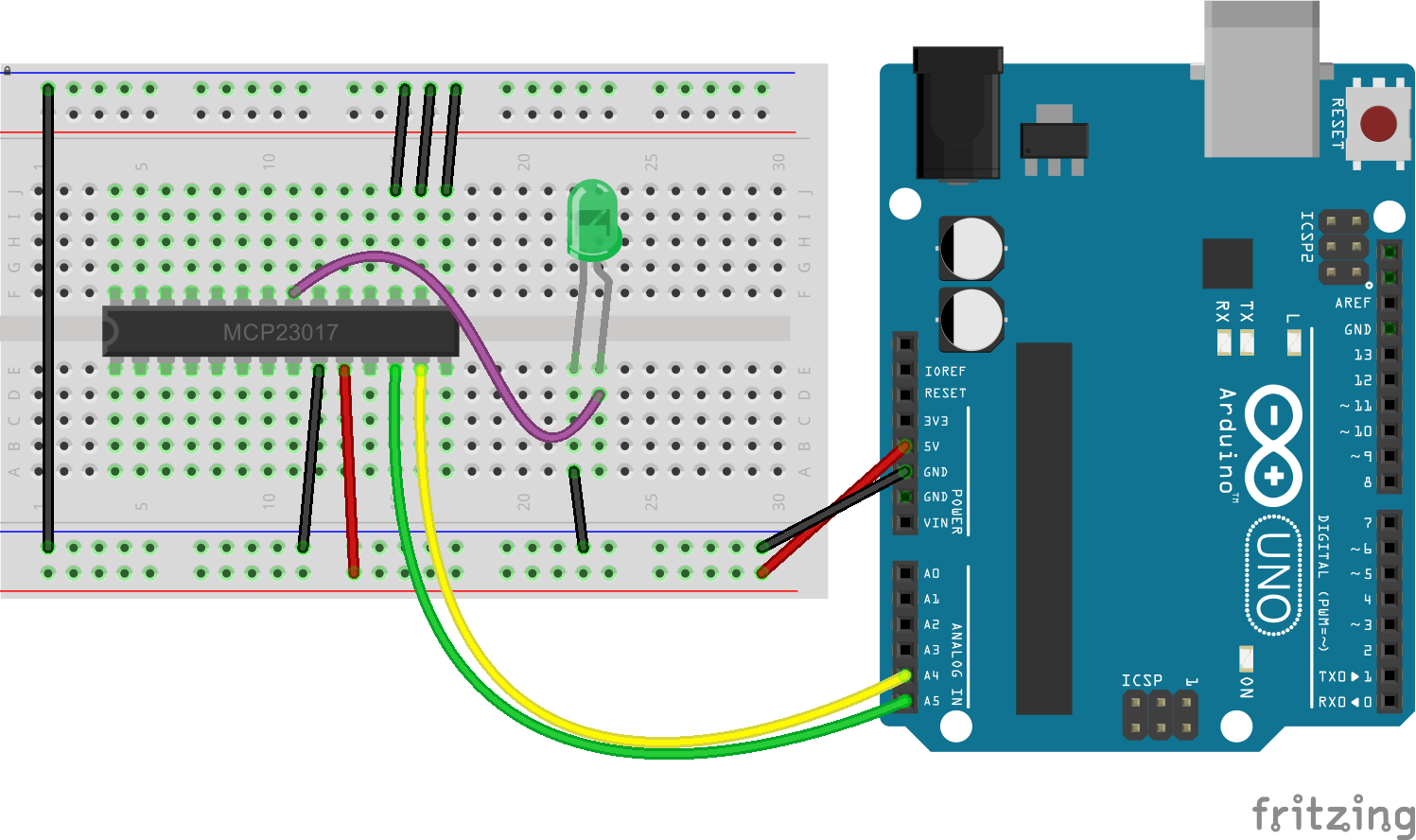
// Create a MCP23017 Expander object:
//
// - attach SDA and SCL to the I2C pins on
// your board (A4 and A5 for the Uno)
// - specify the MCP23017 controller
new five.Expander("MCP23017");
// or
new five.Expander({
  controller: "MCP23017"
});

// or

new five.Expander({
  controller: "MCP23017",
  address: 0x??
});
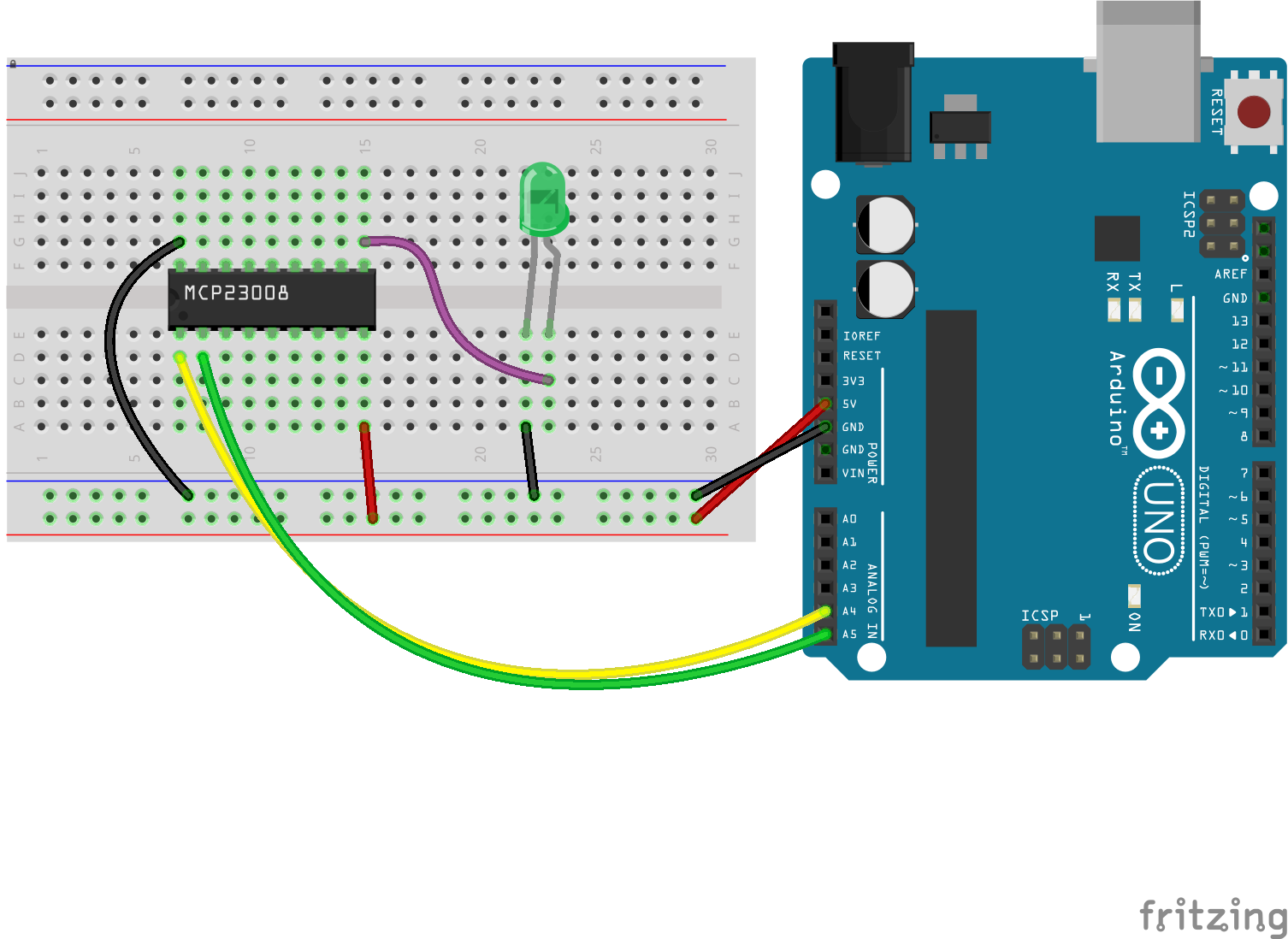
// Create a MCP23008 Expander object:
//
//  - attach SDA and SCL to the I2C pins on
//     your board (A4 and A5 for the Uno)
//  - specify the MCP23008 controller

new five.Expander("MCP23008");

// or

new five.Expander({
  controller: "MCP23008"
});

// or

new five.Expander({
  controller: "MCP23008",
  address: 0x??
});
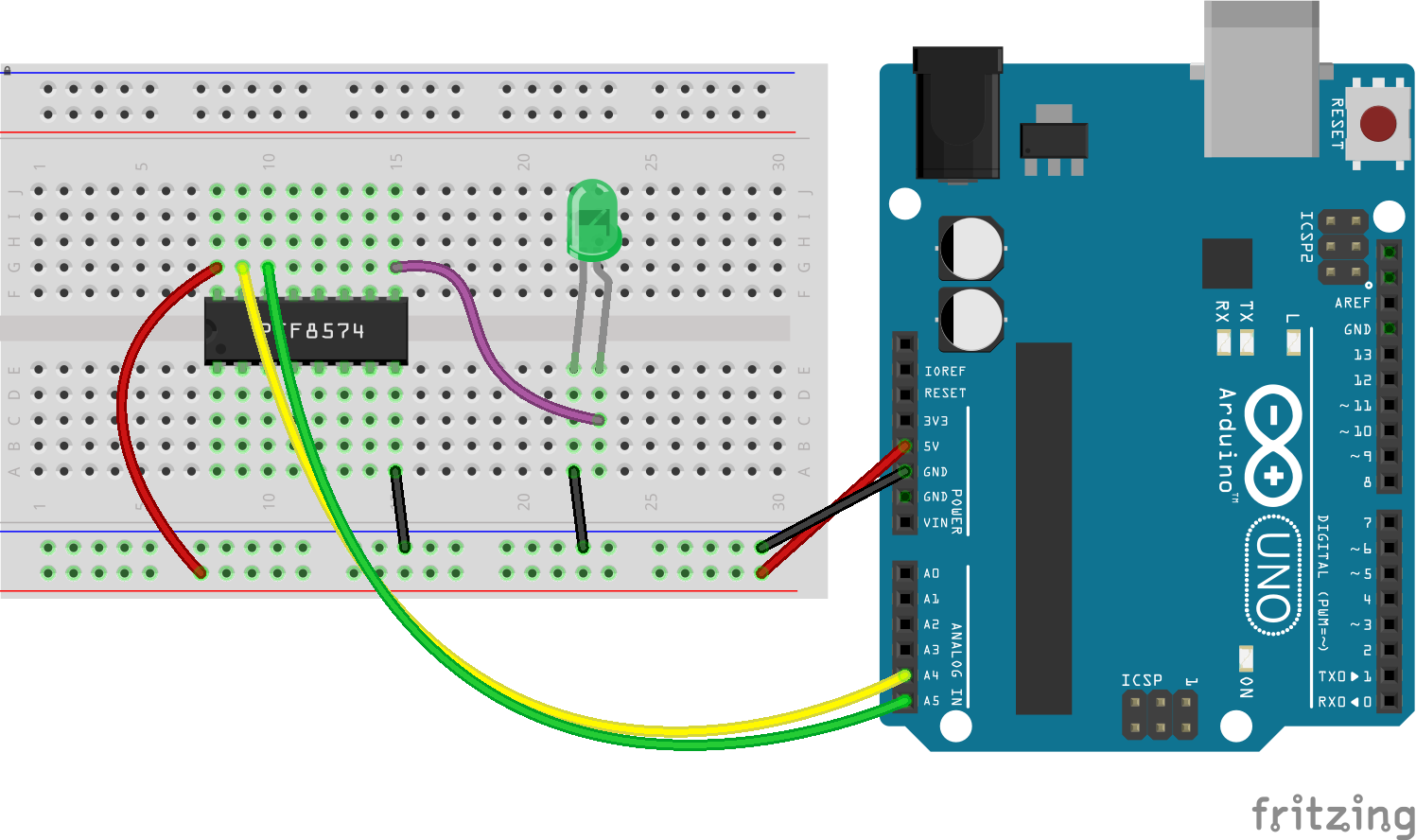
// Create a PCF8574 Expander object:
//
//  - attach SDA and SCL to the I2C pins on
//     your board (A4 and A5 for the Uno)
//  - specify the PCF8574 controller

new five.Expander("PCF8574");

// or

new five.Expander({
  controller: "PCF8574"
});

// or

new five.Expander({
  controller: "PCF8574",
  address: 0x??
});
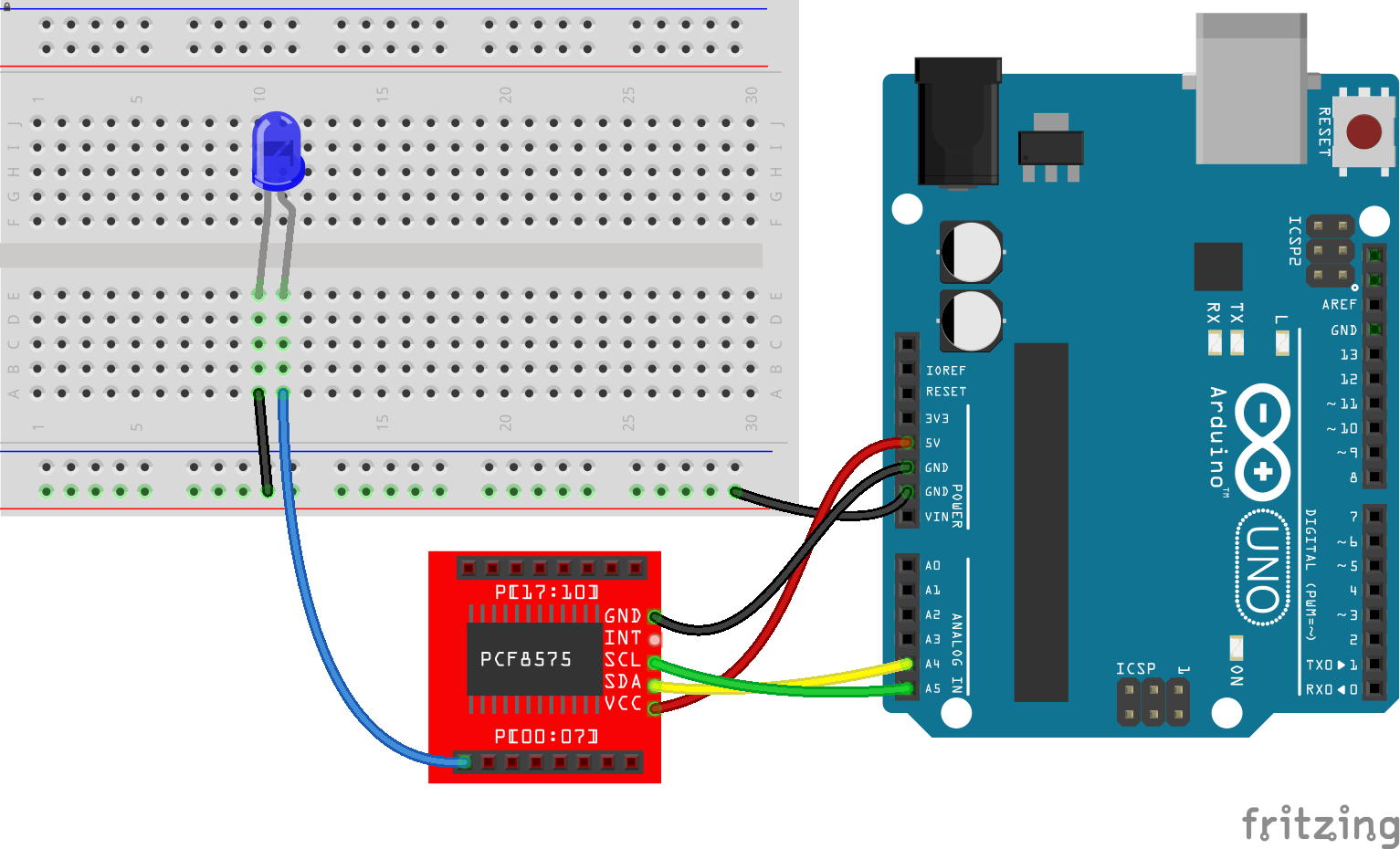
// Create a PCF8575 Expander object:
//
//  - attach SDA and SCL to the I2C pins on
//     your board (A4 and A5 for the Uno)
//  - specify the PCF8575 controller

new five.Expander("PCF8575");

// or

new five.Expander({
  controller: "PCF8575"
});

// or

new five.Expander({
  controller: "PCF8575",
  address: 0x??
});
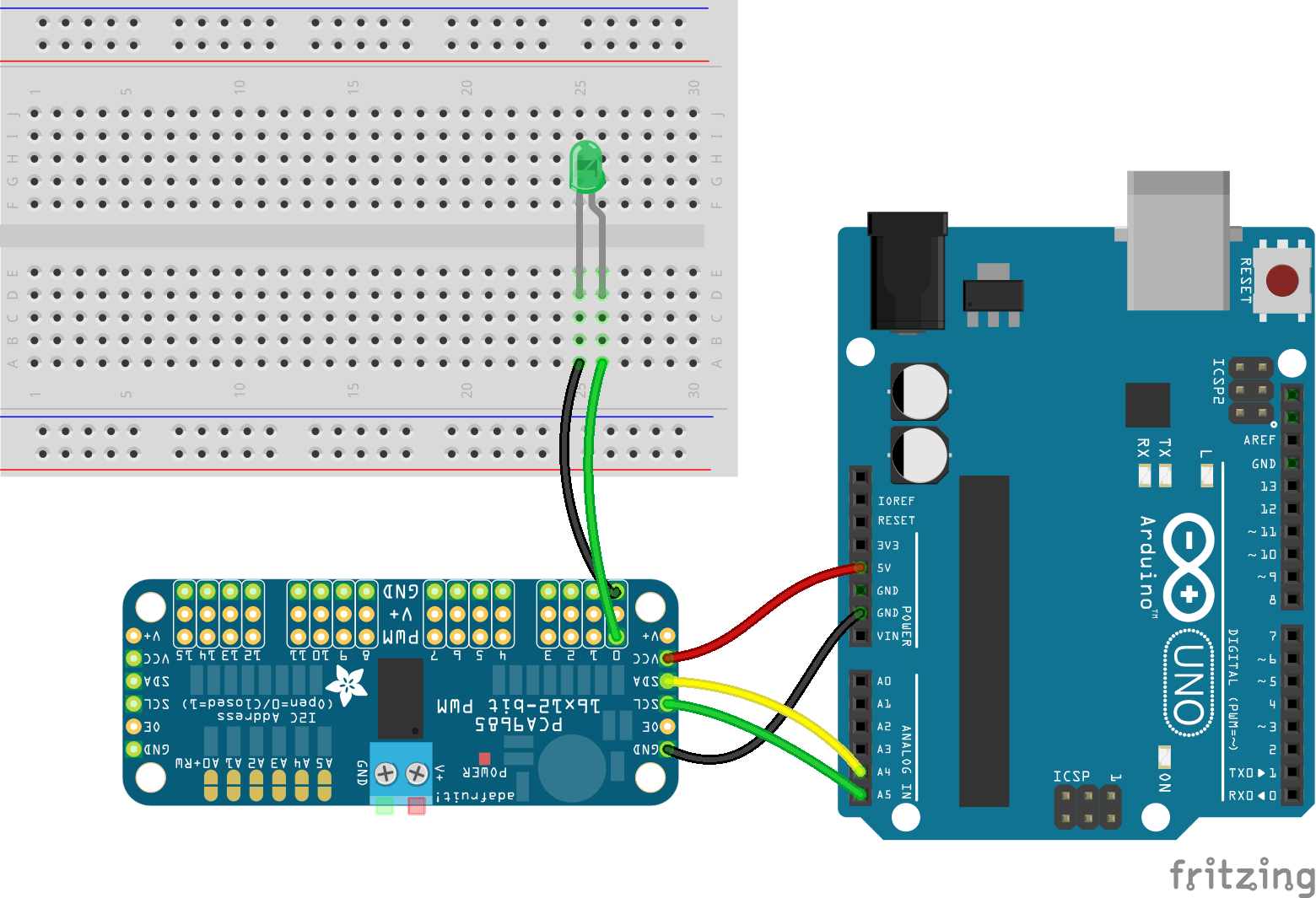
// Create a PCA9685 Expander object:
//
//  - attach SDA and SCL to the I2C pins on
//     your board (A4 and A5 for the Uno)
//  - specify the PCA9685 controller

new five.Expander("PCA9685");

// or

new five.Expander({
  controller: "PCA9685"
});

// or

new five.Expander({
  controller: "PCA9685",
  address: 0x??
});
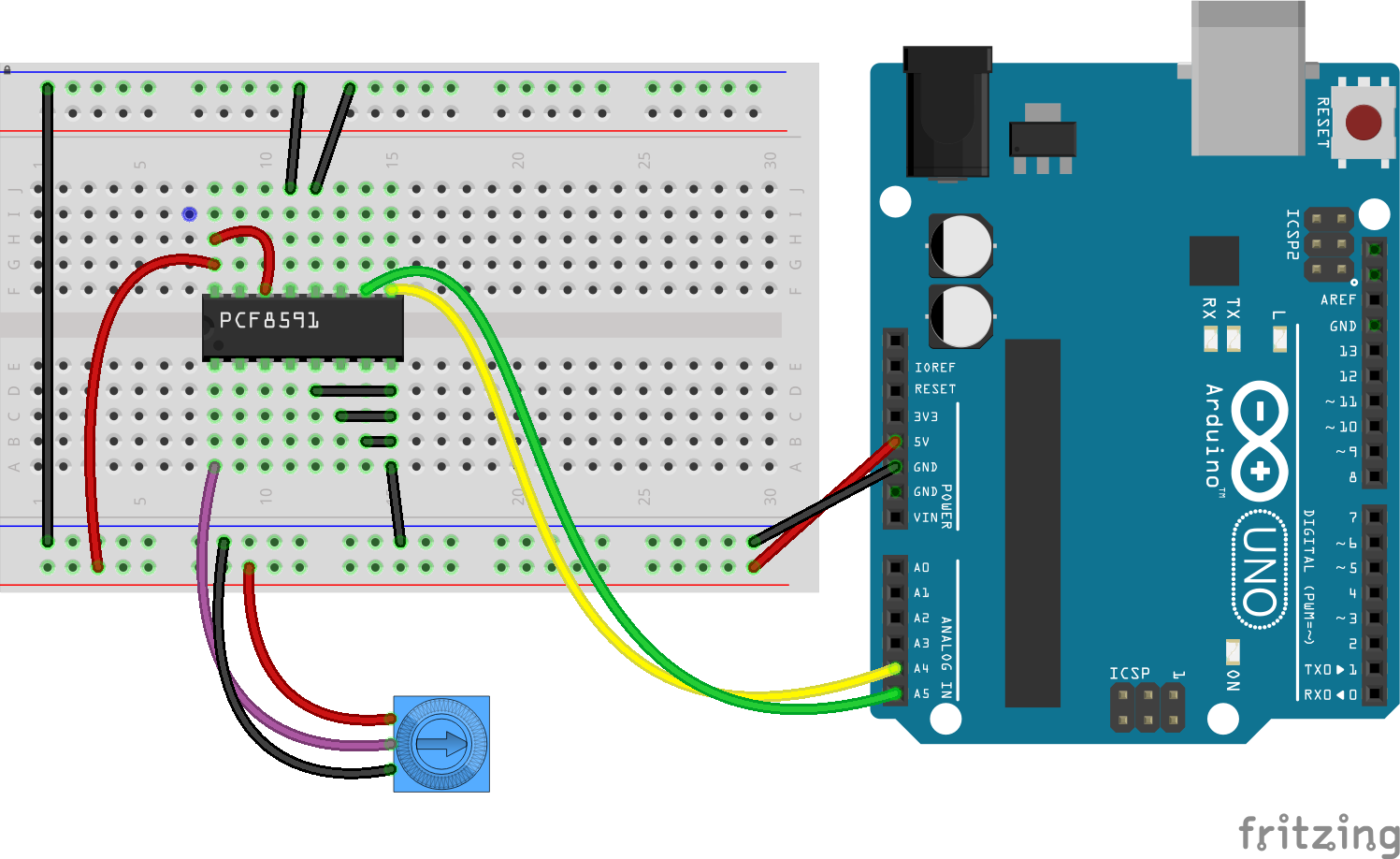
// Create a PCF8591 Expander object:
//
//  - attach SDA and SCL to the I2C pins on
//     your board (A4 and A5 for the Uno)
//  - specify the PCF8591 controller

new five.Expander("PCF8591");

// or

new five.Expander({
  controller: "PCF8591"
});

// or

new five.Expander({
  controller: "PCF8591",
  address: 0x??
});
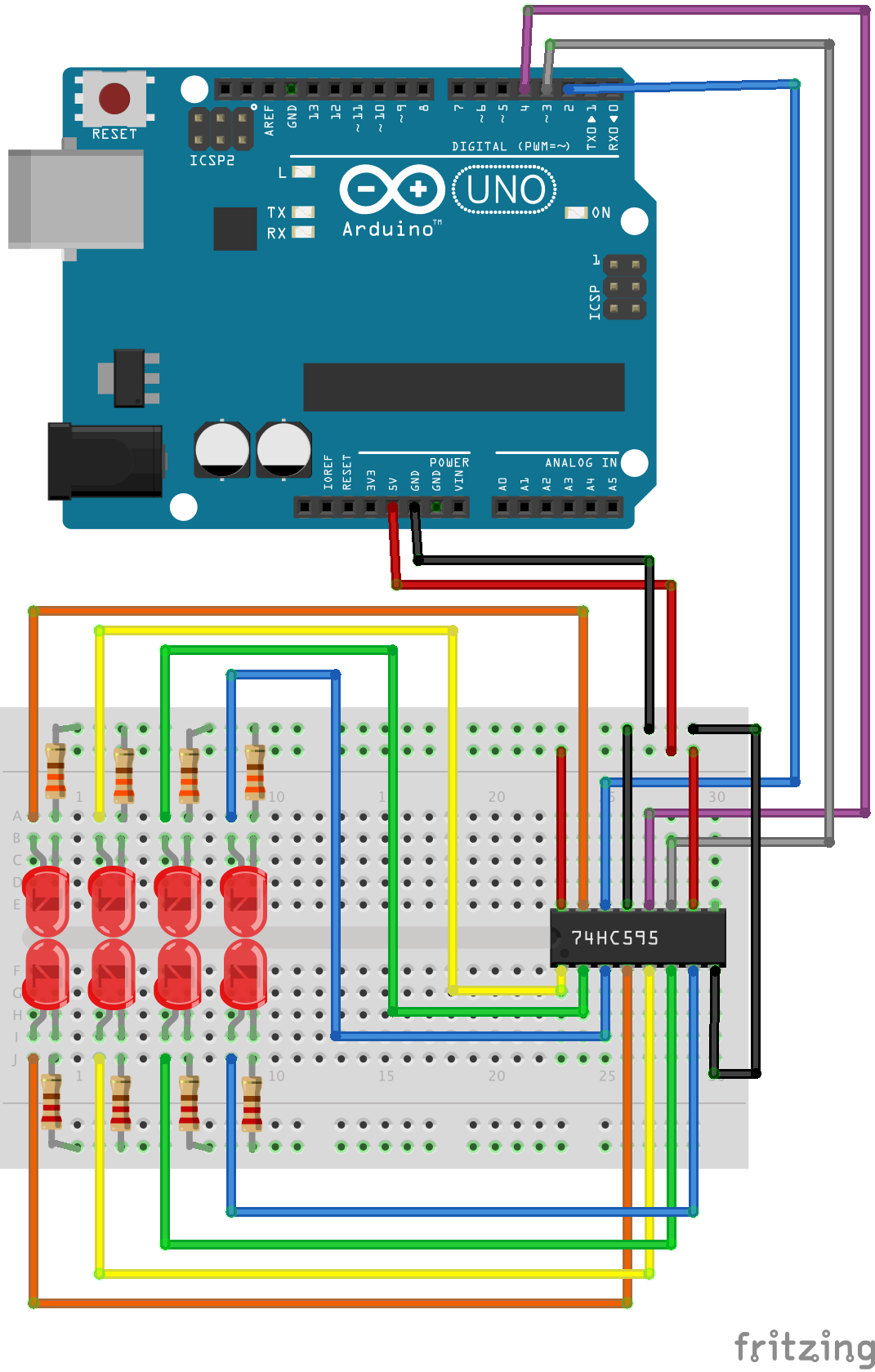
// Create a 74HC595 Expander object:
// (change pins to appropriate pins for board)
new five.Expander({
  controller: "74HC595",
  pins: {
    data: 2,
    clock: 3,
    latch: 4
  }
});
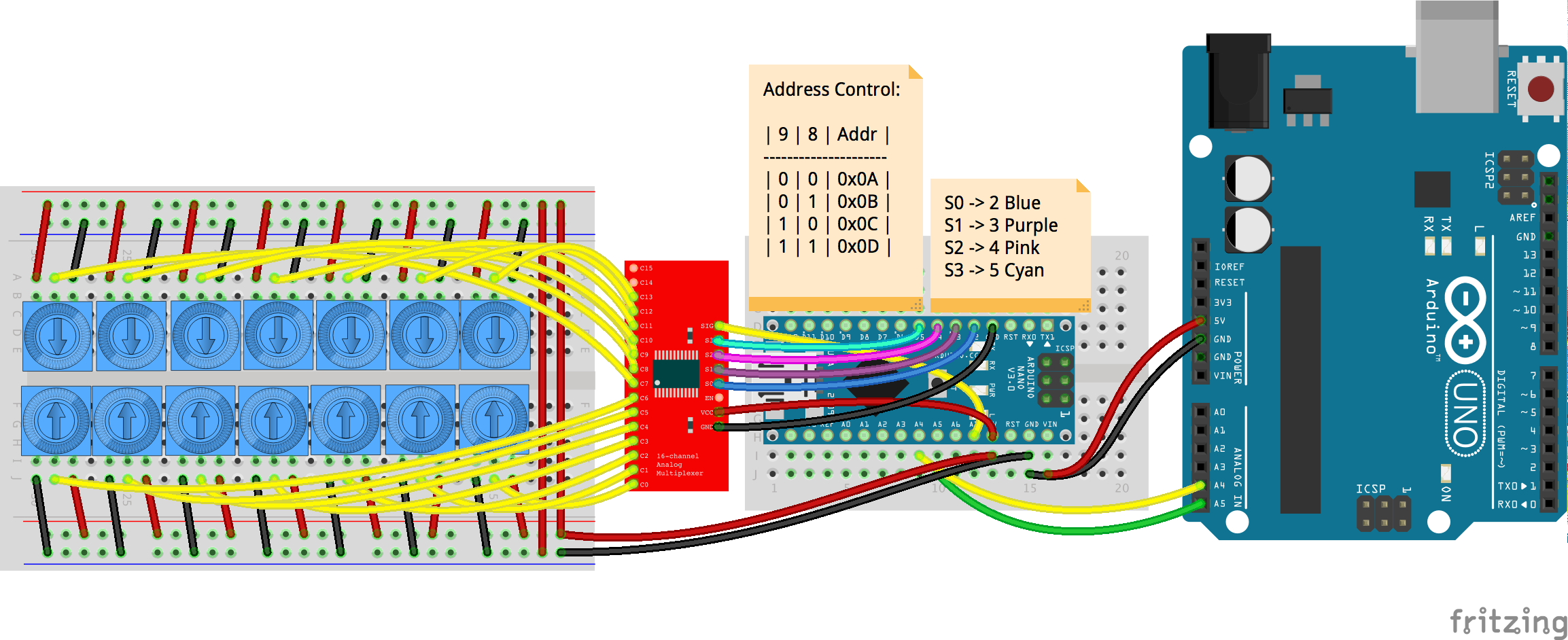
// Create a CD74HC4067 Expander object:
//
//  - attach SDA and SCL to the I2C pins on
//     your board (A4 and A5 for the Uno)
//  - specify the CD74HC4067 controller

new five.Expander("CD74HC4067");

// or

new five.Expander({
  controller: "CD74HC4067"
});

// or

new five.Expander({
  controller: "CD74HC4067",
  address: 0x??
});
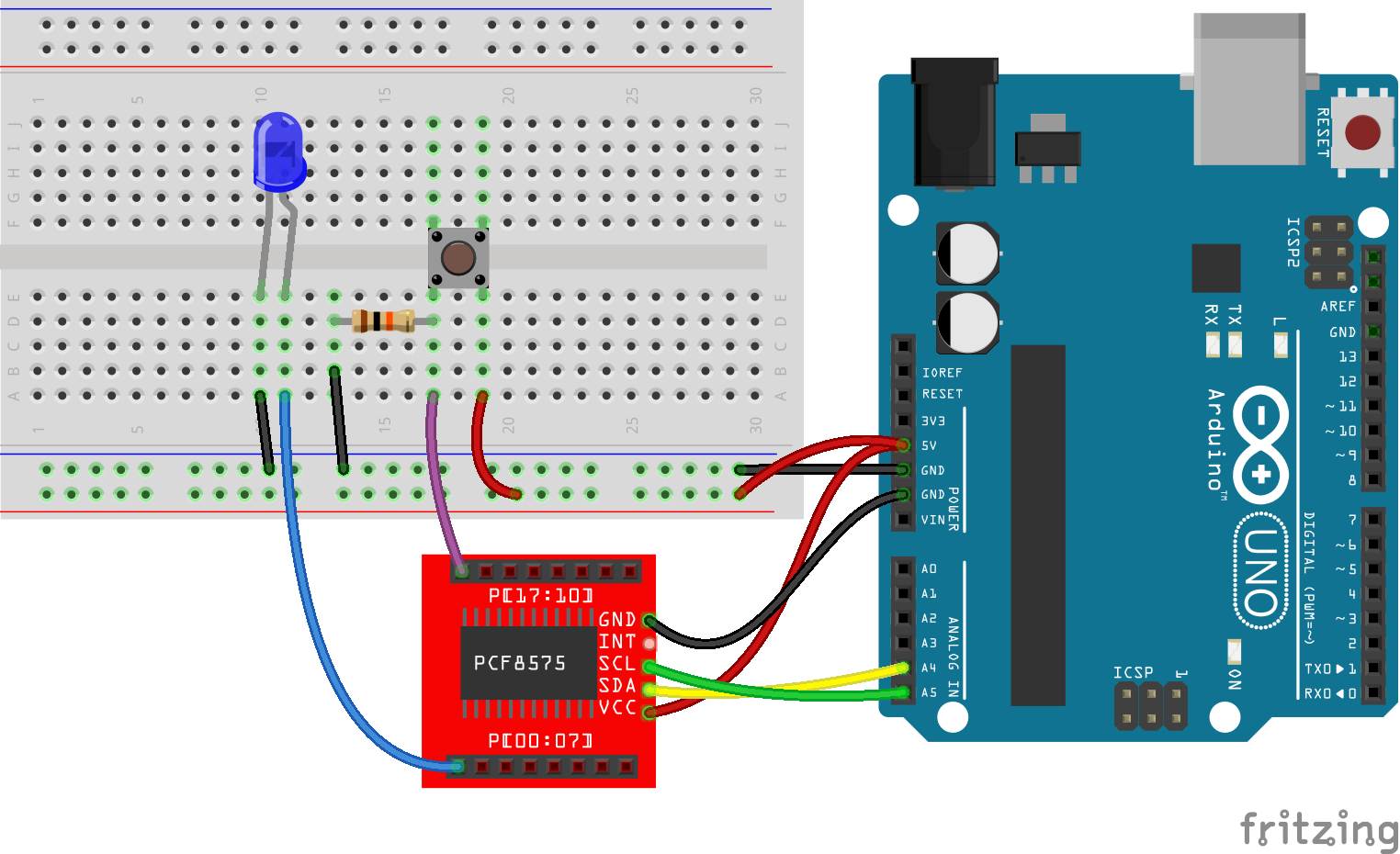
Expander objects have the same surface API as an IO Plugin, which allows them to be optionally used as an IO Plugin themselves. The usage examples here show how an Expander can be used to create a virtual board with Board.Virtual that can be passed to any Johnny-Five component class initialization.
var five = require("johnny-five");
var board = new five.Board();

board.on("ready", function() {
  var expander = new five.Expander({
    controller: "PCA9685"
  });

  var virtual = new five.Board.Virtual({
    io: expander
  });

  var led = new five.Led({
    pin: 0,
    board: virtual
  });

  led.on();
  // or
  // led.pulse();
});
var five = require("johnny-five");
var board = new five.Board();

board.on("ready", function() {
  // An Expander instance can also be passed
  // directly as an argument to Virtual
  var virtual = new five.Board.Virtual(
    new five.Expander("PCF8575")
  );

  var led = new five.Led({
    board: virtual,
    pin: 0,
  });

  var button = new five.Button({
    board: virtual,
    pin: 17,
  });

  button.on("press", function() {
    led.on();
  });

  button.on("release", function() {
    led.off();
  });
});
While the API of an Expander instance will be the same as a Board instance, not all capabilities will always be supported. In latter cases, attempts to call methods that would result in attempting an unsupported operation will throw an exception.
-
normalize(pin) Provides pin value normalization. In most cases, this will simply return the value it was passed. It exists to override the default Firmata-centric normalization.
expander.normalize(1); // 1;
-
pinMode(pin, mode) Set the mode of a pin. Must correspond to a mode listed in the
MODESproperty. Expander Capabilitiesexpander.pinMode(0, expander.MODES.INPUT);
-
analogRead(pin, handler) Read an
ANALOGpin. Expander Capabilitiesexpander.analogRead(0, function(value) { ... });
-
digitalRead(pin, handler) Read an
INPUTpin. Expander Capabilitiesexpander.digitalRead(0, function(value) { ... });
-
analogWrite(pin, 0-255) An alias to
pwmWrite, for backward compat only. UsepwmWriteinstead. -
digitalWrite(pin, HIGH | LOW) Write a
HIGHorLOWvalue to anOUTPUTpin. Expander Capabilitiesexpander.digitalWrite(0, 1);
-
pwmWrite(pin, 0-255) Write an 8-bit PWM value to a
PWMpin. Expander Capabilitiesexpander.pwmWrite(0, 255);
-
servoWrite(pin, 0-180) Write a 0-180° value to a
SERVOpin. Expander Capabilitiesexpander.servoWrite(0, 180);
-
digital-read-# Whenever
digitalRead(pin, ...)is called, an event handler with naming form ofdigital-read-#(where # is the pin number) is registered. -
analog-read-# Whenever
analogRead(pin, ...)is called, an event handler with naming form ofanalog-read-#(where # is the pin number) is registered. -
ready For compatibility with IO Plugins only. This event is meaningless, so don't use it.