
Create captioned Quran videos — AI-powered subtitles, 40+ languages, full visual control.






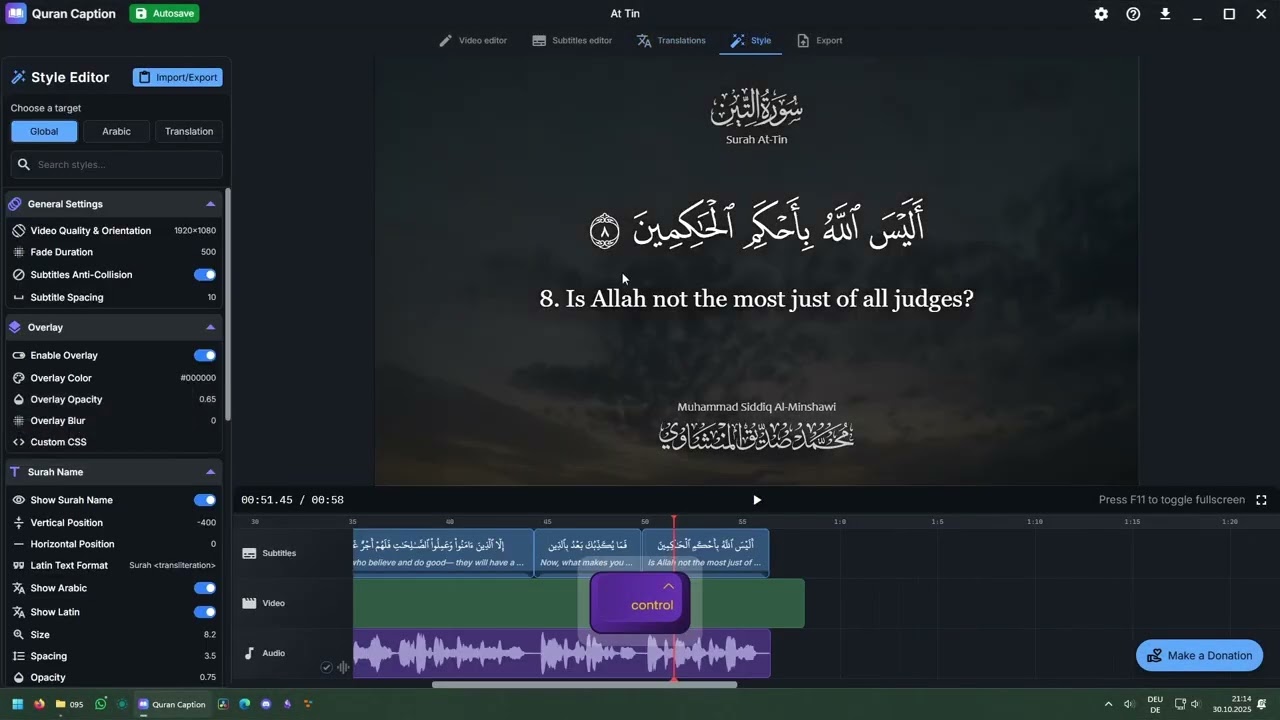
Quran Caption is a desktop video editor built specifically for Quranic recitations. Upload an audio or video file, let the AI generate perfectly-timed subtitles, pick your translation(s), customize the look, and export — ready for YouTube, TikTok, or Instagram.
No video editing experience required.
Drop in any recitation and Quran Caption automatically segments it verse by verse. The AI handles:
- Mid-verse cuts
- Silence detection
- Basmala & Istiʿādha detection
Both cloud and local processing are supported.
When a verse is split mid-way, the translation is automatically trimmed to match exactly what's being recited. No more manually editing translation segments — the AI takes care of alignment, and you can always review and override.
A built-in library of translations syncs automatically with subtitles. Supported languages include English, French, Spanish, Dutch, Turkish, and 35+ more. All translations are editable.
Every visual aspect is adjustable:
- Font family, weight, size, spacing, alignment
- Text colors, outline, shadow, background overlays
- Subtitle placement and margins
- Creator branding, reciter name (calligraphy), surah name, verse numbers
- Custom images and video overlays
Output videos optimized for any platform — YouTube, Instagram Reels, TikTok, and more.


| Platform | Link |
|---|---|
| 🪟 Windows | Direct download (.exe) |
| 🍎 macOS (Apple Silicon & Intel) | Installation guide |
| 🐧 Linux (Ubuntu, Debian, Arch) | Installation guide |
Free and open source. Always.
Quran Caption is used by channels from small community pages to dedicated Quran media teams:
@QuranCaption · @SimpleQuran-tv · @curlyhairedmuslim · @quran.español · @QuranTheNūr · @quran_traduit · @quranicoasis1 · @MasjidDTWS · and hundreds more 🤲
| 📥 Downloads | 🌍 Languages | 🎬 Videos Created | ⭐ Rating |
|---|---|---|---|
| 7 000+ | 40+ | 10 000+ | 4.8 / 5 |
Full documentation — installation, features, style editor, export settings — at:
qurancaption.com/documentation
See DEVELOPMENT.md for the full setup guide, architecture overview, and tech stack details.
After cloning, you'll need to add ffmpeg, ffprobe, and yt-dlp binaries to src-tauri/binaries/. Instructions and download links are in src-tauri/binaries/README.md.
Stack: Svelte · TypeScript · Rust · Tauri · Python · Tailwind CSS
Issues and pull requests are welcome. If you've found a bug or have a feature idea, open an issue or jump into the Discord.
Made with ❤️ by Rayane Staszewski